In this blogpost, we will understand about how to insert data asynchronously into Cosmos DB No SQL API with Python.
Table of Contents
- Pre-requisites:
- Choosing Partition Key
- Async Data Insertion in Cosmos DB NoSQL container
- Outputs
- Takeaways
Pre-requisites:
- An Azure Cosmos DB NoSQL API account
- GitLab personal account.
- A JSON file to insert the data. Download the Nike_Discounts file by signing up at Kaggle website.
Please refer previous article on Insert data synchronously into Cosmos DB NoSQL API with Python to understand synchronous data insertion to Cosmos DB NoSQL API using python code.
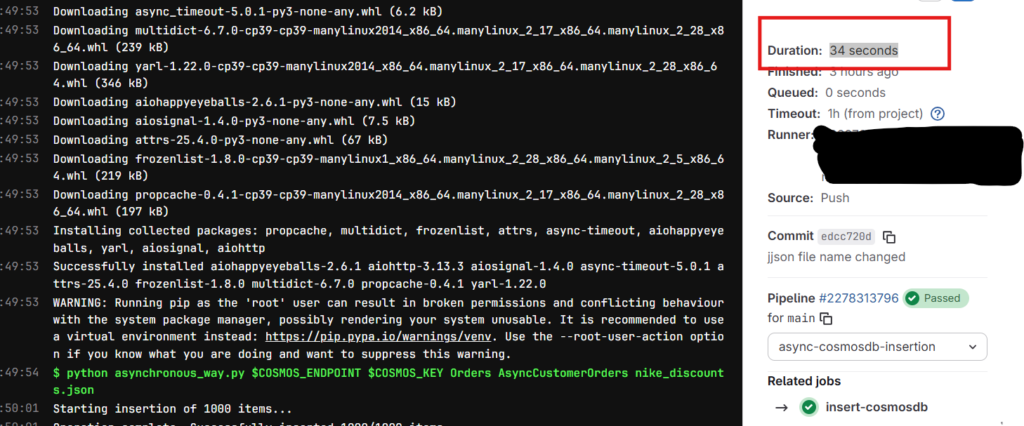
Results: Insertion of 1,000 JSON records into cosmos db container completed in 34 seconds.
Note: You can setup your local environment using any Python supported IDE such as VS Code. I don’t want to go through VS Code and Python installations on my laptop and instead I choose GitLab free plan for this demo.
Choosing Partition Key
Before jumping into the hands-on exercise, I would like you to focus on the partition key that is set for the cosmos db container. After observing the JSON file via Copilot, I got below columns as the best candidates for choosing as partition key.
Best Candidates
product_code
✅ Unique per item → ensures even distribution
✅ Stable (doesn’t change)
❌ If queries often group by product families, this may scatter results.
Note: I specified the partition key as product_code while creating the container AsyncCustomerOrders in Cosmos DB NoSQL API.
Async Data Insertion in Cosmos DB NoSQL container
Initially, upload the JSON file in the GitLab repository and use the below yml script for setting up the stage. Use Python code to insert the data asynchronously into the container.
insert-cosmosdb:
  stage: async-cosmosdb-insertion
  image: python:3.9-slim
  before_script:
    - pip install --upgrade pip
    - pip install azure-cosmos
    - pip install aiohttp
  script:
- python asynchronous_way.py $COSMOS_ENDPOINT $COSMOS_KEY Orders AsyncCustomerOrders nike_discounts.jsonAdd the $COSMOS_ENDPOINT and $COSMOS_KEY as GitLab variables under Settings -> CI/CD in the repository,
Python Cosmos DB Script for Async
Use the below Python script to insert data into Cosmos DB.
import asyncio
import json
import sys
from azure.cosmos.aio import CosmosClient

# Load configuration from environment variables (best practice for CI/CD)
COSMOS_ENDPOINT = sys.argv[1]
COSMOS_KEY = sys.argv[2]
CONTAINER_DATABASE = sys.argv[3]
CONTAINER_NAME = sys.argv[4]
JSON_FILE_PATH = sys.argv[5]

async def insert_items():
    # Initialize the Async Client
    async with CosmosClient(COSMOS_ENDPOINT, credential=COSMOS_KEY) as client:

        # Get Database and Container

        database = client.get_database_client(CONTAINER_DATABASE)
        container = database.get_container_client(CONTAINER_NAME)

        # Read JSON file
        try:
            with open(JSON_FILE_PATH, 'r') as f:
                data = json.load(f)
        except FileNotFoundError:
            print("Error: data.json file not found.")
            return

        # Create a list of tasks for concurrent insertion
        tasks = []
        for item in data:
            tasks.append(
                container.create_item(
                    body=item,
                    enable_automatic_id_generation=True
                )
            )

        print(f"Starting insertion of {len(tasks)} items...")

        # Execute all tasks concurrently
        results = await asyncio.gather(*tasks, return_exceptions=True)

        # Error checking
        success_count = 0
        for i, result in enumerate(results):
            if isinstance(result, Exception):
                # result is the Exception object itself
                print(f"Failed to insert item index {i}: {result}")
            else:
                success_count += 1

        print(f"Operation complete. Successfully inserted {success_count}/{len(data)} items.")

if __name__ == "__main__":
asyncio.run(insert_items())In this asynchronous Cosmos DB Client, we first connect to the Cosmos DB client and then database and container. Once the connection established, we read the JSON file and append the items that needs to be inserted into a list.
The await asyncio.gather will add all the list items and starts inserting the data into the container. enable_automatic_id_generation will generate id values automatically in the container.
Monitoring Cosmos DB Requests
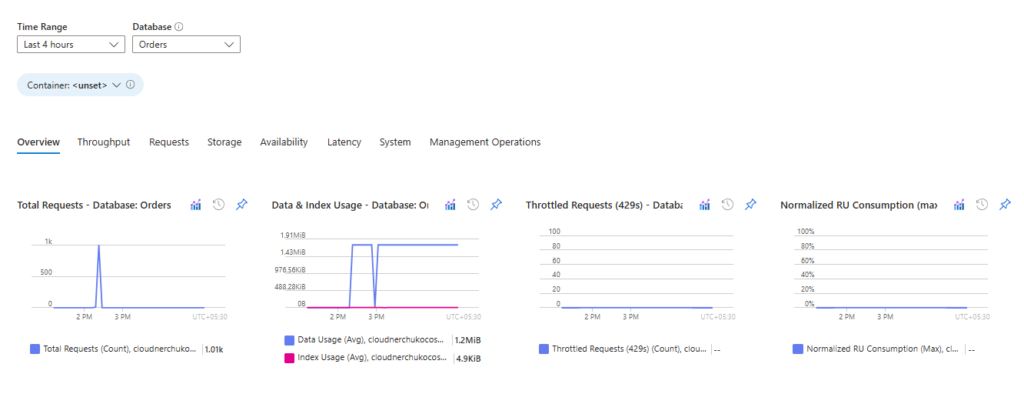
Monitoring Azure Cosmos DB via the Azure Portal is essential for identifying performance bottlenecks. If you observe request throttling (429 errors), it typically indicates a need to increase the provisioned Request Units (RUs) for your container.
During async activity, we don’t see any throttle requests as shown in the below image.
Outputs
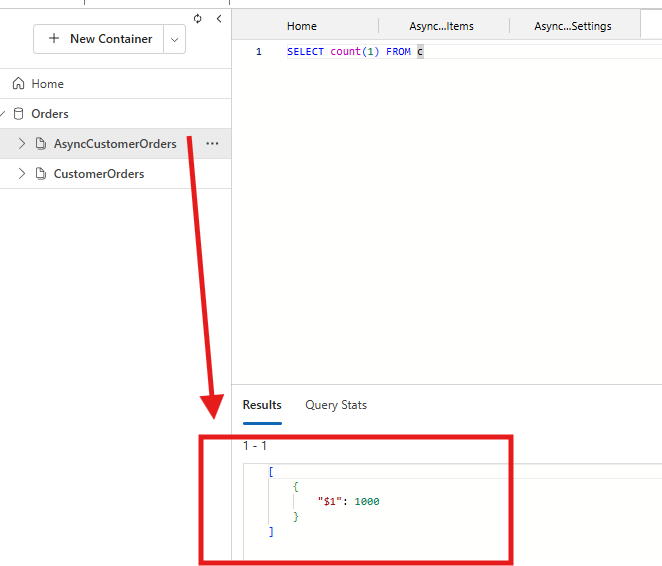
The below output shows a count of 1000 in Azure Cosmsos DB explorer, confirming that all items have been successfully inserted into the Cosmos DB container.
Time taken for the GitLab job
The total time taken to just insert a 1000 JSON records is almost 34 seconds. Imagine the time it takes if 100,000 records to be inserted into the container using asynchronously. Watch out for RUs while using async way of insertion into the container.
The JSON file size is around 1.7 MB.
Takeaways
Asynchronous insertion needs some knowledge to understand how it works but the code is simple to write. The records are processed asynchronously into the container until the JSON file is completely read.
Choose the correct Partition Key to avoid the hotspots that your data might create in the container. Async method is best approach compared to Synchronous method of insertion into cosmos db.
Comment your views on this blogpost on Cosmos DB using Asynchronous method. For more blogposts, visit CloudNerchuko.in
Disclaimer: This content is human-written and reflects hours of manual effort. The included code was AI-generated and then human-refined for accuracy and functionality.
1 thought on “Asynchronous Data Insertion into Cosmos DB NoSQL API with Python”