In this blogpost, you will learn about inserting data synchronously into Azure Cosmos DB NoSQL API with Python code.
Pre-requisites:
- An Azure Cosmos DB NoSQL API account
- GitLab personal account.
- A JSON file to insert the data. Download the Nike_Discounts file by signing up at Kaggle website.
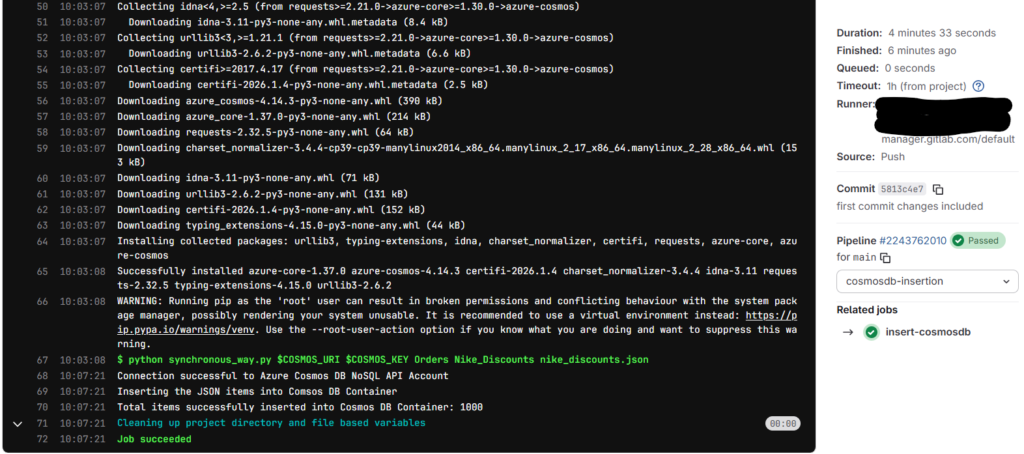
Results: Insertion of 1,000 JSON records completed in 4:33 minutes.
Note: You can setup your local environment using any Python supported IDE such as VS Code. I don’t want to go through VS Code and Python installations on my laptop and instead I choose GitLab free plan for this demo.
Choosing Partition Key
Before jumping into the hands-on exercise, I would like you to focus on the partition key that is set for the cosmos db container. After observing the JSON file via Copilot, I got below columns as the best candidates for choosing as partition key.
Best Candidates
product_code
✅ Unique per item → ensures even distribution
✅ Stable (doesn’t change)
❌ If queries often group by product families, this may scatter results.
group_key
✅ Groups variants (colors/sizes) under one product family
✅ Useful if queries fetch all variants of a product together
❌ Lower cardinality than product_code, but still decent.
target (e.g., “Nike Sale US”)
❌ Too low cardinality → most items will fall into one partition → hotspot risk.
created_at
❌ Bad choice → time-based keys cause uneven distribution and hotspots
My suggestion is to avoid selecting the keys which creates hotspots in the container.
Note: I specified the partition key as product_code while creating the container in Cosmos DB NoSQL API. It distributes the data according to the product code.
Data Insertion in Cosmos DB NoSQL container
Initially, upload the JSON file in the GitLab repository and use the below yml script for setting up the stage. The Python code is present in synchronous_way.py file.
insert-cosmosdb:
  stage: cosmosdb-insertion
  image: python:3.9-slim
  before_script:
    - pip install --upgrade pip
    - pip install azure-cosmos
  script:
    - python synchronous_way.py $COSMOS_URI $COSMOS_KEY Orders Nike_Discounts nike_discounts.json
Add the $COSMOS_URI and $COSMOS_KEY as GitLab variables under Settings -> CI/CD in the repository,
Python Cosmos DB Script
Use the below Python script to insert data into Cosmos DB.
# Python code to insert data into Cosmos DB NoSQL API container using Synchronous method

# import required packages
import sys
import json
import uuid
from azure.cosmos import CosmosClient
from azure.cosmos.exceptions import (
    CosmosHttpResponseError,
    CosmosResourceNotFoundError,
    CosmosResourceExistsError,
)

# Get the Arguments

COSMOS_ENDPOINT = sys.argv[1]
COSMOS_KEY = sys.argv[2]
CONTAINER_DATABASE = sys.argv[3]
CONTAINER_NAME = sys.argv[4]
JSON_FILE_PATH = sys.argv[5]

# Validation

if not COSMOS_ENDPOINT or not COSMOS_KEY:
    print("ERROR: COSMOS_ENDPOINT and COSMOS_KEY are not specified to the script.")
    sys.exit(1)

# Initiate a client connection using Key.

client = None

try:
    if not COSMOS_ENDPOINT or not COSMOS_KEY:
        raise ValueError("Missing COSMOS ENDPOINT or COSMOS KEY.")

    client = CosmosClient(url = COSMOS_ENDPOINT, credential = COSMOS_KEY)
    database = client.get_database_client(CONTAINER_DATABASE)
    container = database.get_container_client(CONTAINER_NAME)

    print("Connection successful to Azure Cosmos DB NoSQL API Account")

    # Read the JSON file
    with open(JSON_FILE_PATH, 'r') as file:
        data = json.load(file)

    # Ensure data is a list
    if isinstance(data, dict):
        data = [data]
    elif not isinstance(data, list):
        raise ValueError("JSON file must contain a list or a single object.")

    total_items = 0
    print("Inserting the JSON items into Comsos DB Container")

    # Process and insert items
    for item in data:

        # create item in Cosmos DB
        container.create_item(
            body = item,
            enable_automatic_id_generation = True
        )
        total_items += 1
    print(f"Total items successfully inserted into Cosmos DB Container: {total_items}")

except CosmosResourceNotFoundError as e:
    print(f"[ERROR] Resource not found: {e}")
    sys.exit(2)
except CosmosHttpResponseError as e:
    print(f"[ERROR] Cosmos HTTP error: {e}")
    sys.exit(3)
except Exception as e:
    print(f"[ERROR] Unexpected failure: {e}")
    sys.exit(5)
finally:
    if client is not None:
        client = None
The Python script first reads the input file and stores it in a dictionary. Using a for loop with container.create_item inserts the data into the container using auto generated id value with the help of enable_automatic_id_generation parameter.
In the end, we are counting the total items inserted into the container and making the client None.
Use error handling in the script to identify the issues while working with the code.
Monitoring Cosmos DB Requests
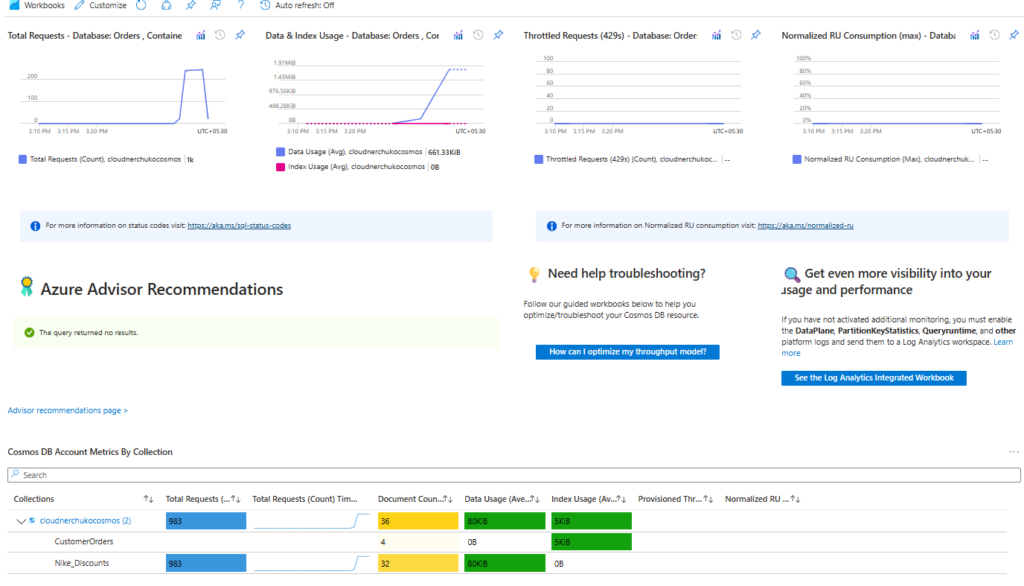
Monitoring Cosmos DB in Azure Portal helps you to identify any bottlenecks in your code. Sometimes, you need to increase the RUs count for the container (if dedicated throughput) if you see any throttle requests on the container.
Here is the good thing, we don’t get throttle requests as it is a synchronous way using Python code.
In the below diagram, I captured my metrics on how many requests, Data and Index usage, Throttle requests etc.
Outputs
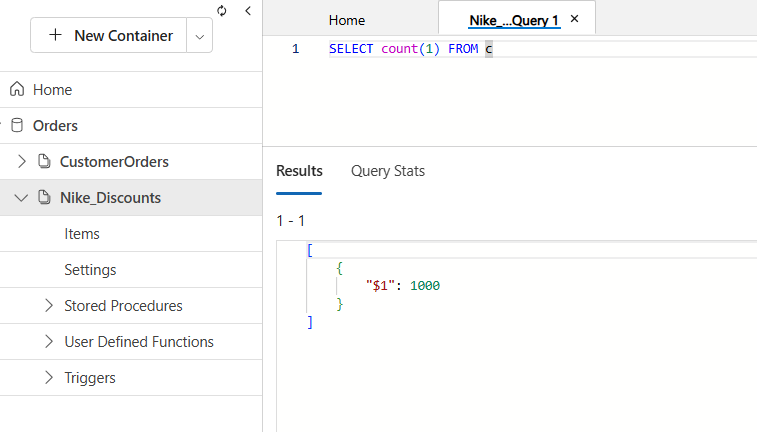
The below output shows a count of 1000, confirming that all items have been successfully inserted into the Cosmos DB container.
Time taken for the GitLab job
The total time taken to just insert a 1000 JSON records is almost 4 minutes 33 seconds. Imagine the time taken if 10,000 records to be inserted into the container.
The file size is just around 1.7 MB.
Takeaways
Synchronous insertion is simple and straightforward. Each record is processed one at a time, making it easy to validate and debug.
Partition Key matters the most as it will affect the querying and the data distribution in Cosmos DB container. We cannot scale the insertion in cosmos db, and this is a limitation.
Comment your views on this blogpost on Cosmos DB. For more blogposts, visit CloudNerchuko.in
Disclaimer: This content is human-written and reflects hours of manual effort. The included code was AI-generated and then human-refined for accuracy and functionality.
2 thoughts on “Insert data synchronously into Cosmos DB NoSQL API with Python”