
In this blogpost, I will explain about the differences between the on prem SQL Server and the SQL Managed Instance hosted on Azure Cloud.
Enterprise workloads are moving from on‑premises systems to cloud platforms. This change has reshaped how relational databases are managed. As on today, Microsoft offers two choices, SQL Server and Azure SQL Managed Instance.
Of course, there are other Azure SQL services such as Azure SQL Server on VM and Azure SQL database. But, in this blogpost we are comparing the SQL Server with SQL Managed Instance.
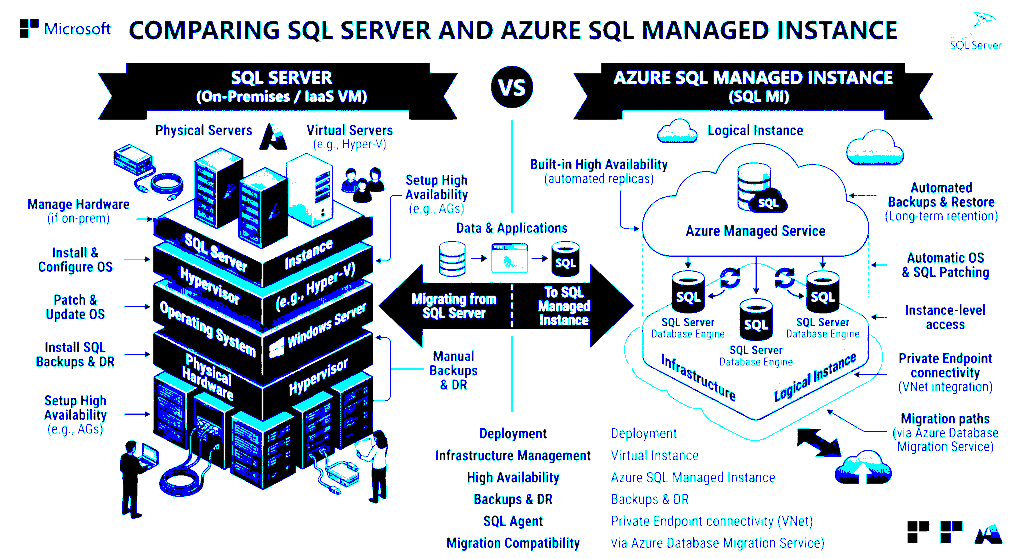
Fundamental Difference between SQL Server and SQL MI
SQL Server, when deployed on‑premises, follows the IaaS model. Users control the OS, file system, and database version. This flexibility supports apps needing OS‑level hooks or custom agents. But it also means the team must handle high availability, disaster recovery, patching, and hardware management.
The hardware and database file management task is a big overhead in on-premises SQL Server. Conversely, Azure SQL Managed Instance is a fully managed PaaS offering designed to provide near 100% feature parity with the SQL Server Enterprise Edition engine while abstracting the underlying infrastructure.
| Feature | SQL Server (On-Prem/VM) | Azure SQL Managed Instance |
| Management Responsibility | User (OS, SQL, Hardware) | Microsoft (OS, SQL, Infrastructure) |
| Operating System Access | Full Access | No Access |
| Deployment Model | IaaS | PaaS |
| High Availability | Manual Configuration | Built-in (99.99% SLA) |
| Automated Backups | User Configured | Built-in / Automatic |
| Software Updates | User Managed | Automated / Always Up-to-Date |
On-Prem Server Compute and Storage
Buying an Enterprise SQL Server license is necessary to setup the SQL Server in on-premises. We need also setup a Virtual Machine to host the SQL Server and a Storage (like 1 TB) to store the database files and also backup files depending on the frequency.
If you configure high availability and also Disaster recovery scenarios, the cost of capital expenditure will rise compared to Azure SQL MI. SQL Server comes in different editions, such as Standard and Enterprise. These editions vary mainly in the additional features they provide.
Based on the business needs, the storage size can be adjusted in the on-prem SQL Server setup.
This beautiful article will explain the pricing of SQL Server. Microsoft SQL Server Licensing Guide (2025 Edition)
For understanding connectivity Architecture of SQL MI, read Connectivity Architecture – Azure SQL Managed Instance | Microsoft Learn
Azure SQL MI Compute and Storage
Azure SQL Managed Instance (SQL MI) is a fully managed Platform‑as‑a‑Service (PaaS) offering from Microsoft. It combines the rich features of SQL Server with the simplicity of a managed cloud service.
Unlike on‑premises SQL Server, you don’t need to manage infrastructure, patching, backups, or high availability.
Azure SQL Managed Instance (SQL MI) is a fully managed Platform‑as‑a‑Service (PaaS) offering from Microsoft. It combines the rich features of SQL Server with the simplicity of a managed cloud service. Unlike on‑premises SQL Server, you don’t need to manage infrastructure, patching, backups, or high availability—Microsoft handles all of that.
Azure SQL Managed Instance utilizes a vCore-based purchasing model, which allows for independent scaling of compute and storage resources.
Below are the Service tiers offered by Microsoft in vcore model:
- General Purpose
- Next-Gen General Purpose
- Business Critical
| Characteristic | General Purpose | Next-Gen GP | Business Critical |
|---|---|---|---|
| Best For | Standard workloads | Standard workloads | Mission-critical / Low latency |
| Storage Type | Remote Premium Storage | Remote Premium Storage | Local SSD |
| I/O Latency | 5-10 ms | 3-5 ms | 1-2 ms |
| In-Memory OLTP | Not Supported | Not Supported | Supported |
| Read Scale-out | 0 | 0 | 1 (Included) |
| Max Database Size | 16 TB Max | 32 TB Max | 16 TB Max |
| IOPS | Minimum 500 IOPS Max depends on File size (log and data files) | Minimum 300 IOPS. Max depends on Storage Size | per v-core 4000 IOPS. |
You can check the documentation for SQL MI storage or IOPS and compute limitations in this Resource Limits – Azure SQL Managed Instance | Microsoft Learn.
The hardware generations available for Managed Instance are as below:
- Standard-series (Gen5)
- Premium-series
- Memory Optimized premium-series
| Feature | Standard-series (Gen5) | Premium-series | Memory Optimized Premium-series |
| CPU Generation | Intel® E5-2673 v4 (Broadwell) | Intel® 8370C (Ice Lake) | Intel® 8370C (Ice Lake) |
| Clock Speed | 2.3 GHz – 2.5 GHz | 2.8 GHz | 2.8 GHz |
| vCore Range | 2 – 80 | 2 – 128 | 4 – 128 |
| Memory per vCore | 5.1 GB | 7 GB | 13.6 GB |
Instance-Level Features and T-SQL Compatibility
There are some differences between the On Prem SQL Server and Azure SQL MI. While most of the on-prem features are supported in Aure SQL MI, but some instance level features and also some commands are not supported.
SQL Server Agent
SQL Server Agent is always running and supports T-SQL job steps, SSIS job steps, and replication jobs (Snapshot, Transactional, and Distributor). However, certain job steps such as the Merge Replication job step, PowerShell job step and the Queue Reader are not supported. Additionally, since Managed Instance cannot access local file shares, any job steps involving robocopy or file system interactions must be re-architected to use Azure Blob Storage.
Linked Servers
Linked Servers in Managed Instance do not support targets like Excel, CSV, or other non-SQL RDBMS providers. The linked servers can be pointed to on-prem and execute OPENROWSET and RPC calls to on-prem databases.
MSDB Target Server Role
The target server role is not supported in SQL Managed Instance. Since SQL MI is a single PaaS service, it cannot be managed by other servers.
You can find all the T-SQL differences in the official documentation of Microsoft, T-SQL Differences Between SQL Server & Azure SQL Managed Instance – Azure SQL Managed Instance | Microsoft Learn
TSQL Commands not supported in SQL MI
| T-SQL Category | Unsupported or Modified Statements |
| Availability | CREATE AVAILABILITY GROUP, ALTER AVAILABILITY GROUP, SET HADR |
| Backup/Restore | BACKUP TO DISK (Use TO URL), RESTORE FROM DISK (Use FROM URL) |
| Stored Procedures | xp_cmdshell, sp_attach_db, sp_detach_db, sp_addextendedproc |
| Configuration | sp_set_agent_properties (Agent settings are read-only) |
| Database Properties | SERVERPROPERTY(‘InstanceName’) and @@SERVICENAME return NULL |
Identity Management and Data Protection
On-prem SQL Server supports Windows Authentication, SQL Logins to connect to the database.
Managed Instance supports Microsoft Entra logins, SQL Logins and Entra users, enabling centralized identity management across the Azure ecosystem.
Data Protection
Data protection in Managed Instance is achieved through multiple layers:
- Transparent Data Encryption (TDE): Enabled by default for all databases to protect data at rest.
- Always Encrypted: Protects sensitive data in use, at rest, and in transit, ensuring that even DBAs cannot view plain-text data.
- Dynamic Data Masking: Protects sensitive data for non-privileged users without altering the underlying data.
- SQL Ledger: Provides a tamper-evident audit log for sensitive data changes, which is critical for regulated industries like finance and healthcare.
Auditing differences
Auditing in Managed Instance is distinct from SQL Server. It operates at the server level and stores .xel files directly in Azure Blob Storage. The traditional TO FILE and Windows Event Log targets are not supported.
On‑prem SQL Server gives you full control but requires heavy manual management of audits and ledger tables. Azure SQL MI standardizes auditing into Azure services, with ledger tables supported natively, reducing compliance overhead.
| Feature | SQL Server On‑Premises | Azure SQL Managed Instance |
|---|---|---|
| Audit Targets | Local files, Windows logs | Azure Blob, Log Analytics, Event Hub |
| Management | Full DBA control | PaaS managed infra, DBA sets policies |
| Ledger Tables | SQL Server 2022+, manual setup | Supported, integrated with Azure services |
| Compliance Handling | Manual database backup retention & storage | Automated Backups, cloud‑native integration |
| Security | Depends on infra setup | Built‑in encryption & Azure security |
Also Read:
Step-by-Step Guide: Creating an Azure SQL Managed Instance (Pay-As-You-Go & Free Offer)
Azure SQL MI Standby replica and Read replica functionality
Azure SQL MI Failover Group Pre-Requisites
Different database restore methods in Azure SQL MI
Total Cost of Ownership (TCO) Savings
Total cost of ownership for running SQL Server on‑premises highlights the main cost categories and why overall capital expenditure (CAPEX) is higher compared to Azure SQL Managed Instance (MI)
Categories include:
Compute: Server Hardware, Virtualization, Operating System.
Storage: Primary storage, Backup and DR storage and expansion costs for scaling the storage.
Licensing:
SQL Server edition, Software assurance and CAL for individual user licenses.
Operational Overheads:
Datacenter costs, Maintenance contracts for hardware annually, Staffing (DBAs, infra engineers, SQL developers etc.)
| Cost Category | On‑Prem SQL Server (IaaS) | Azure SQL MI (PaaS) |
|---|---|---|
| Compute | Upfront server purchase | Pay‑as‑you‑go vCores |
| Storage | SAN/NAS upfront cost | Scales per GB/month |
| Licensing | Per‑core, Enterprise costly | Included in service |
| HA/DR | Extra servers + licenses | Built‑in by Microsoft |
| Operations | Power, cooling, AMC, staff | Microsoft manages infra |
I didn’t add HA DR setup cost to the TCO. Imagine what would be the cost if we sum up all these components.
For example, I listed the cost per category per month for a mid-sized company.
| Category | Approx. Monthly Cost (USD) | Key Drivers |
|---|---|---|
| Licensing (Amortized + SA) | $3,200 – $4,500 | Amortized initial license + annual Software Assurance (25–35%). |
| Hardware (Compute & VM) | $800 – $1,500 | Amortized cost of 2 high‑end servers + maintenance (refresh every 5 years). |
| Redundant Storage & SAN | $1,200 – $2,000 | Enterprise storage systems, hardware warranties, and offsite data retention. |
| Facilities (Power, Cooling, Rack) | $1,000 – $2,500 | Climate control (HVAC), power consumption, and physical security. |
| Operations & Managed Staffing | $7,000 – $12,000 | 24/7 DBA support, internal labor for testing, and security audits. |
| Total Estimated Monthly TCO | $13,200 – $22,500 | Comprehensive cost of self‑managed enterprise data. |
In SQL Managed Instance, the highest tier is Business critical service tier. Considering, we don’t DBAs, sysadmins to manage a PaaS service and its Infrastructure. The cost of SQL MI is $10,565/month for enabling Zone redundancy, 16vcore, 1024 Storage size with Standard series gen 5 hardware.
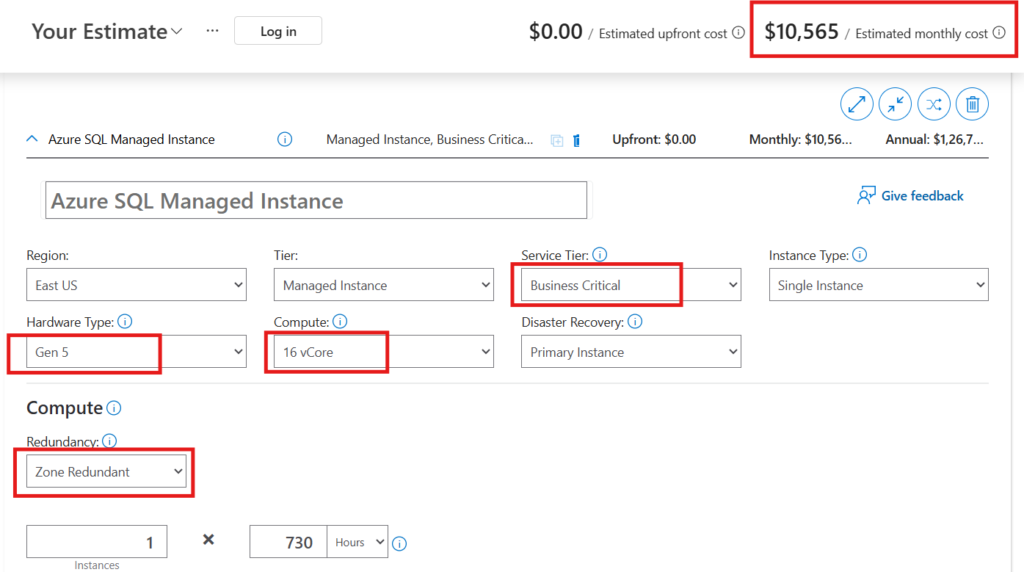
Azure SQL MI with Business-Critical tier can reduce monthly costs by 20–40% compared to a fully loaded on‑prem Enterprise setup.
If you switch to the General-Purpose tier, expenses drop even further about 50% lower than the Business-Critical tier. The cost for General-Purpose service tier is $4,241 per month.
Conclusion
Thank you for reading this blog post. I hope it gave you clarity on the differences between SQL Server and Azure SQL Managed Instance across various categories.
I’d love to hear from you to share the challenges you’ve faced while working with on‑prem SQL Server, or the differences and experiences you’ve noticed with Azure SQL MI. Drop your thoughts in the comments, and I’ll go through them.
Please check out other blog posts on my website Cloud Nerchuko.