
When managing an Azure SQL Managed Instance (SQL MI), losing track of the local administrator password or needing to rotate credentials is a common administrative task. Fortunately, the Azure Portal allows administrators to reset the SQL authentication password directly from the instance overview page without requiring direct T-SQL access or server downtime.
Follow the below steps and change or reset the SQL MI admin password in the Azure portal easily.
Step 1: Navigate to Your Instance
Sign in to the Azure Portal, search for SQL managed instances in the top search bar and select your target instance from the list.
Step 2: Open the Reset Password Pane
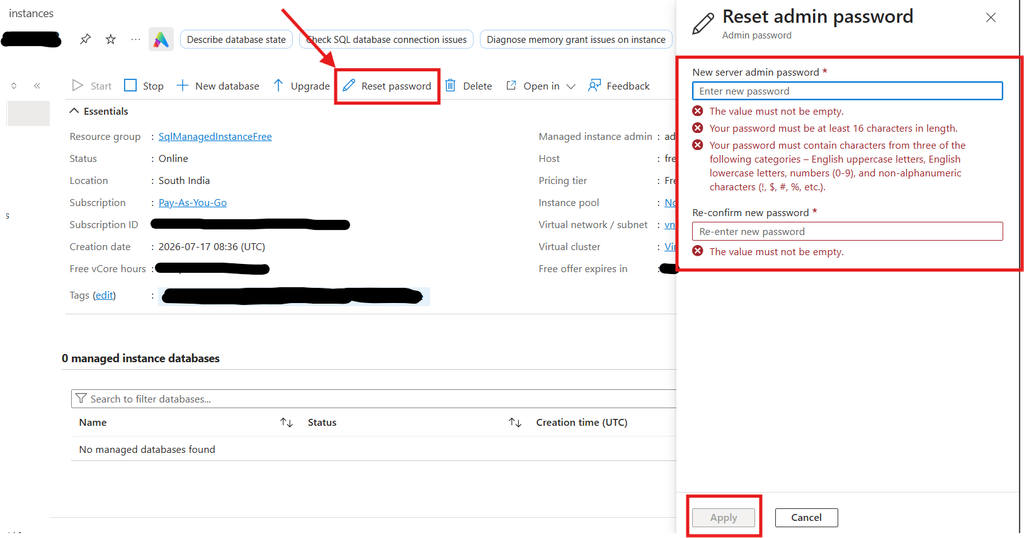
On your instance’s Overview page, locate the top command bar directly above the “Essentials” section. Click the Reset password button (indicated by a pencil icon). You can see the below image for reference.
Step 3: Enter and Confirm the New Password
A Reset admin password panel will slide out on the right side of your screen. Enter your new password and re-enter it to confirm.
To satisfy Azure’s strict complexity policies, your password must meet the following criteria:
- It must be at least 16 characters in length.
- The fields cannot be left empty.
- It must contain characters from at least three of the following categories:
- English uppercase letters
- English lowercase letters
- Numbers (0-9)
- Non-alphanumeric characters (e.g., !, $, #, %)
Step 4: Apply the Changes
Click the Apply button at the bottom of the panel. Azure will process the request and update the local administrator credentials without requiring any server downtime.
Security Best Practice: Transition to Microsoft Entra ID
Unless your legacy applications strictly require native SQL authentication, you should transition to Microsoft Entra ID (formerly Azure AD) authentication. Relying on Entra ID instead of standalone SQL passwords eliminates credential sprawl, allows you to enforce Multi-Factor Authentication (MFA), and enables the use of Managed Identities so your applications can connect without storing passwords in their code.