
An Azure SQL Managed Instance Pool is a shared cloud infrastructure resource that allows you to pre-provision compute capacity and deploy multiple, smaller Azure SQL Managed Instances into a single underlying virtual cluster.
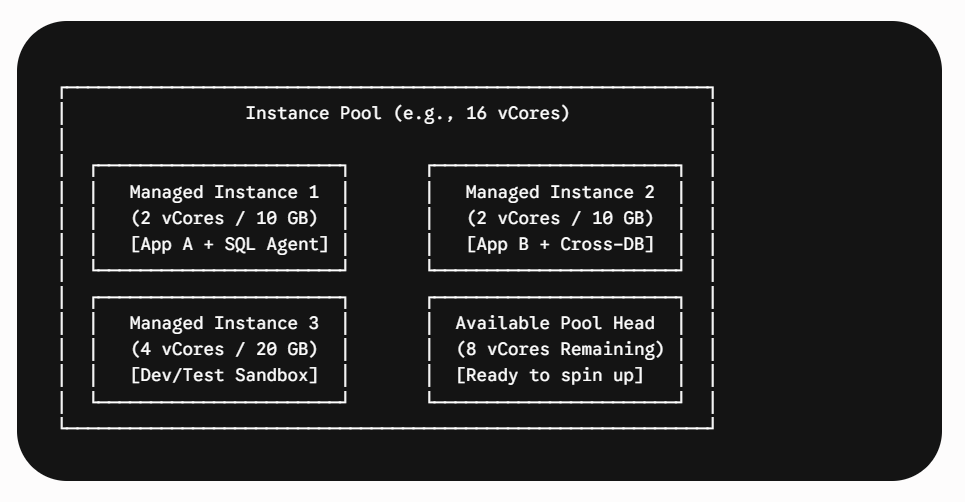
Think of an Azure SQL Managed Instance Pool like a large apartment building:
The building itself = the pool (shared infrastructure, pre-provisioned compute capacity).
Individual apartments = the Managed Instances (smaller, self-contained SQL environments).
Shared utilities (electricity, water, security) = the underlying virtual cluster resources (networking, compute, storage).
Different tenants = different applications or teams, each with their own database instance, but all benefiting from the same building infrastructure.
Instance pools solve the common modernization challenge where organizations want the broad engine compatibility, cross-database querying, and SQL Agent capabilities of Azure SQL Managed Instance (MI), but have workloads that are too small or sporadic to justify the minimum 4-vCore cost of a standalone instance.
Why Use Instance Pools?
When migrating onprem / cloud SQL Server environments (such as hundreds of departmental databases, internal line-of-business apps, or dev/test environments), standalone Managed Instances often lead to over-provisioning and idle compute costs. Instance pools address these issues through three core capabilities:
- Sub-4-vCore Instances (2 vCores): Standalone SQL Managed Instances require a minimum of 4 vCores. Within an instance pool, you can provision lightweight 2-vCore instances, significantly reducing infrastructure costs for small workloads.
- Fast Provisioning: Because the underlying virtual cluster and compute nodes are already provisioned when the pool is created, deploying a new managed instance inside the pool typically completes in under 10 to 15 minutes (compared to hours for initial standalone deployments).
- Cost Predictability: You pay for the aggregate compute capacity allocated to the pool (in increments such as 8, 16, 24, up to 128 vCores), regardless of how many instances are active inside it.
To create a pool, start with at least 8 vCores, then divide them based on the number of instances you need.
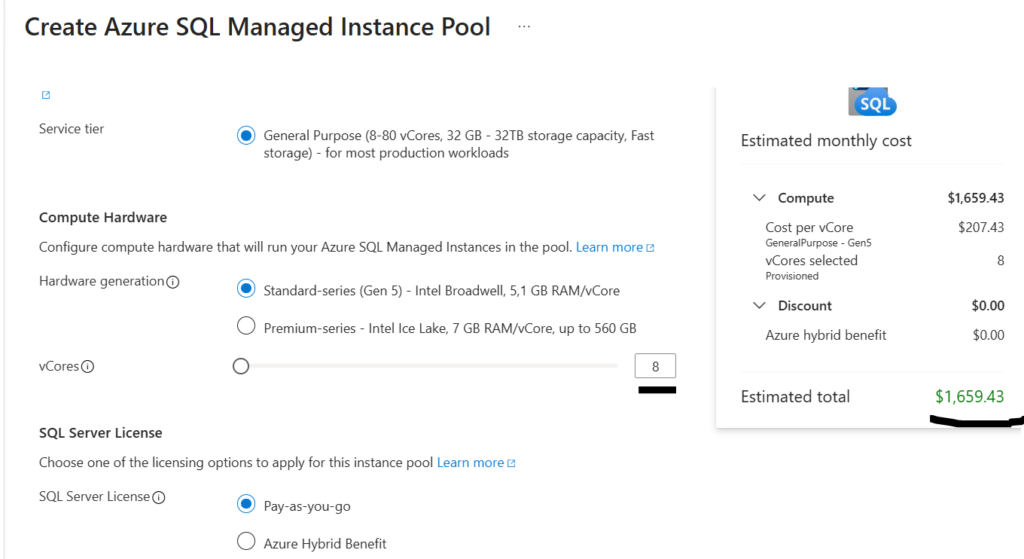
How It Works: Architectural Overview
In a standalone deployment, each SQL Managed Instance receives its own dedicated set of virtual machines (VMs).
Inside an Instance Pool, multiple SQL Server instance processes are co-located across shared virtual machines within a managed virtual cluster:
- CPU & Memory Isolation: Handled at the OS process level using Windows Job Objects and internal SQL Server resource governance to guarantee each instance gets its exact provisioned CPU and RAM.
- Storage Isolation: Remote user database data and log files are stored in dedicated Azure Premium Blob Storage volumes attached to each individual instance.
- Shared Node Resources: The local SSD storage (used for tempdb) and network bandwidth are shared among all instances residing on that physical node.
| Feature / Metric | Standalone SQL Managed Instance | Pooled SQL Managed Instance |
| Minimum Instance Size | 4 vCores | 2 vCores, but to create a pool, minimum vcores needed are 8vcores |
| Supported Service Tiers | General Purpose, Business Critical | General Purpose only |
| Deployment Time | Slower (first instance requires virtual cluster setup) | Fast (~10–15 mins inside existing pool) |
| Billing Model | Per-instance compute & storage | Compute billed at the pool level; storage billed per instance |
| Resource Isolation | Dedicated VM per instance | Dedicated vCPU/RAM; shared local TempDB disk & NIC |
| Maintenance Windows | Configured per instance | Configured at the pool level |
Practical Examples & Use Cases
Example 1: Multi-Tenant Microservice Consolidation
- Scenario: A SaaS platform runs 6 isolated microservices. Each microservice requires SQL Agent jobs, isolated logins, and cross-database queries between two databases, but only utilizes roughly 1–2 vCores of sustained compute.
- Standalone Approach: Requires 6 individual separate 4-vCore SQL MI instances = 24 vCores total. The cost is very high compared to instance pool approach.
- Instance Pool Approach: Deploy a single 16-vCore Pool and spin up 6 separate 2-vCore instances (consuming 12 vCores), leaving 4 vCores spare for burst capacity or testing. This reduces provisioned compute by 33% while preserving complete instance-level boundary separation.
Example 2: Dynamic CI/CD Pipeline & Dev/Test
- Scenario: A continuous delivery pipeline creates a temporary SQL instance to run automated database integration tests against schema migrations and tears it down after tests complete.
- Why Pools Work: Waiting 1–4 hours to provision a standalone instance blocks CI/CD velocity. Inside an instance pool, the test suite spins up a 2-vCore instance in minutes, runs the integration tests, and deletes it.
Limitations and Constraints
Before adopting instance pools, review the below architectural and feature constraints:
- Service Tier Limitation: Instance pools support General Purpose only. The Business Critical tier (In-Memory OLTP, local SSD data caching, built-in read replicas) is not supported in pools.
- Local TempDB Contention: Because instances residing on the same node share local storage, heavy, un-governed tempdb spills or massive temporary table operations in one instance can impact I/O performance on neighboring instances.
- No Mixed Hardware or Licensing: All instances in a pool inherit the pool’s hardware generation (e.g., standard series / Gen5) and licensing model (Azure Hybrid Benefit vs. License Included).
- Subnet Sizing: Instance pools require a dedicated subnet within your Azure Virtual Network. The subnet must be sized appropriately (at least /26 or larger) to accommodate pool nodes and scale operations.
There are many limitations for the SQL MI Instance pools. Refer Create Instance Pool – Azure SQL Managed Instance | Microsoft Learn for more limitations. (Scroll down to the end to find the limitations)
For instance pools, currently there is no support for DR replicas or failover group setup for disaster recovery scenarios.
The content is referenced from What is an instance pool? – Azure SQL Managed Instance | Microsoft Learn. For more information, please go to the Official Microsoft link.
Summary
Azure SQL Managed Instance Pools provide the best cost-to-isolation ratio for hosting fleets of small SQL workloads that depend on the full SQL Server surface area (SQL Agent, Service Broker, linked servers, CLR). For high-performance mission-critical databases requiring dedicated hardware or extreme storage performance, stick with standalone General Purpose or Business Critical instances.
Practice:
To create an SQL MI instance pool using Azure Portal or CLI or PowerShell, follow this Microsoft blog post, Create Instance Pool – Azure SQL Managed Instance | Microsoft Learn
Helpful Content:
7 Proven Strategies to Reduce SQL Managed Instance Costs
Step-by-Step Guide: Creating an Azure SQL Managed Instance (Pay-As-You-Go & Free Offer)
Do You Still Need SQL Managed Services After Moving to the Cloud?