
In our Learn Cloud Basics guide, we learned that cloud computing is just like plugging into an electricity grid. Instead of buying expensive physical servers and keeping them in an air-conditioned room, you rent computing power over the internet and pay only for what you use.
Now, it is time to flip the switch.
Microsoft Azure is one of the largest “computing grids” on the planet. It powers everything from small student projects to massive Fortune 500 banks and enterprises.
Microsoft has already spent billions buying the massive servers, storage drives, and networking gear required to run all this, housing them in highly secure data centers all over the world.
Other major cloud providers like Amazon, Google, and Alibaba use this exact same model.
You can rent, build, and control all of this hardware directly from your web browser using a single dashboard: the Azure Portal available at portal.azure.com.
Welcome to Microsoft Azure: The Core Building Blocks
When you first log into the Azure Portal, you will see hundreds of different services. It is completely normal to feel overwhelmed! The secret that every Cloud Architect knows is this: you do not need to learn all 200+ services. Almost everything built in Azure relies on the exact same foundational building blocks we covered in Cloud Basics plus a way to organize and connect them.
Let’s break down how Azure works, why each piece exists, and explore step-by-step guides on how to build them.
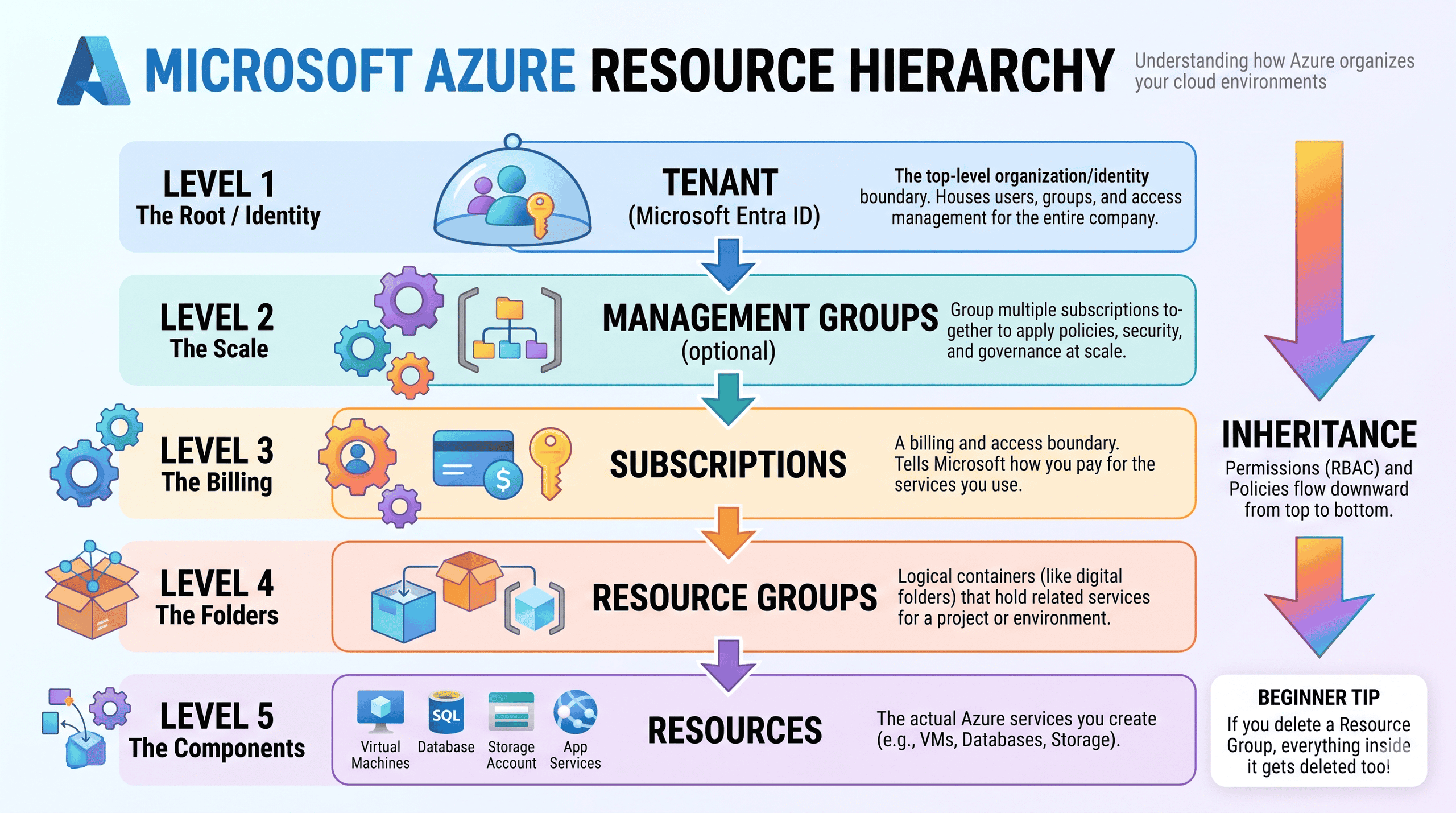
Before you rent a single computer or database in Azure, you need a way to keep your resources organized and control your billing. If you threw 500 files onto your laptop desktop without any folders, it would be chaos. Azure prevents this chaos using a strict 4-level hierarchy.
The Azure hierarchy functions like a corporate filing system, where permissions and security rules flow downwards from top to bottom through a process called inheritance. Granting someone access at a higher level automatically grants them that same access to everything contained underneath it.
- Tenant (The Organization): The absolute top level that acts as the secure identity boundary for a company. It houses the Microsoft Entra ID directory, which manages all user accounts, passwords, and global access. Example: The “Contoso Corporation” employee directory.
- Management Groups (The Divisions): Optional organizational containers used to group multiple subscriptions together. They allow administrators to apply security policies and compliance rules across massive parts of a company all at once. Example: Separate management groups for the “Human Resources,” “Finance,” and “IT” departments in a company.
- Subscriptions (The Billing Accounts): The financial boundary that dictates how Microsoft bills you for services. Every resource must belong to a subscription, and cloud usage costs are tracked here. Example: A “Production Subscription” billed to the main corporate account, and a “Development Subscription” billed to an isolated R&D budget.
- Resource Groups (The Project Folders): Logical folders that hold related services for a specific project or application. They organize resources by lifecycle; if you delete a resource group, every component inside it is also deleted. Example: A “Marketing-Website” group holding both the web server and its connected database.
- Resources (The Components): The actual Azure cloud services and building blocks you create, configure, and use to run your applications. Example: A single Virtual Machine, a SQL Database, or a Storage Account.
To make your learning journey as easy as possible, we have broken down the entire Azure ecosystem into distinct, beginner-friendly categories. Whether you need to rent raw processing power, secure your virtual networks, or explore modern Artificial Intelligence, everything is organized for you right here.
Select a category below and click the button to discover its components, along with real-world analogies and step-by-step, hands-on tutorials!