
If you’re planning a database migration or architecting a new cloud-native solution, you’ve likely hit this exact crossroads: should you choose Azure SQL DB or Azure SQL Managed Instance? Both are fully managed PaaS offerings, but they serve very different use cases. Making the wrong choice early on can lead to architectural roadblocks, complex refactoring, or a massive, unnecessary spike in your cloud bill.
I’ve cut through the standard documentation to show you exactly how these services compare. To make the concepts crystal clear, I’ve included detailed architectural diagrams so you can see exactly what is happening under the hood.
In this post, we will break down the differences across five critical areas:
- Azure SQL DB and Azure SQL MI Definitions
- Architecture: How they differ under the hood.
- The Decision Matrix: Exactly when to choose which resource.
- Feature Parity: What you gain (and lose) with each service.
- Cost: How to avoid paying for infrastructure you don’t need.
Let’s dive in.
What is an Azure SQL Database?
Azure SQL Database is a fully managed, cloud-native service that provides a dedicated single database environment, allowing you to build modern applications without the overhead of managing underlying servers or infrastructure.
What is an Azure SQL Managed Instance?
Azure SQL Managed Instance is a fully managed cloud database that acts almost exactly like a traditional on-premises SQL Server, making it the easiest way to move existing legacy applications to the cloud without rewriting their code.
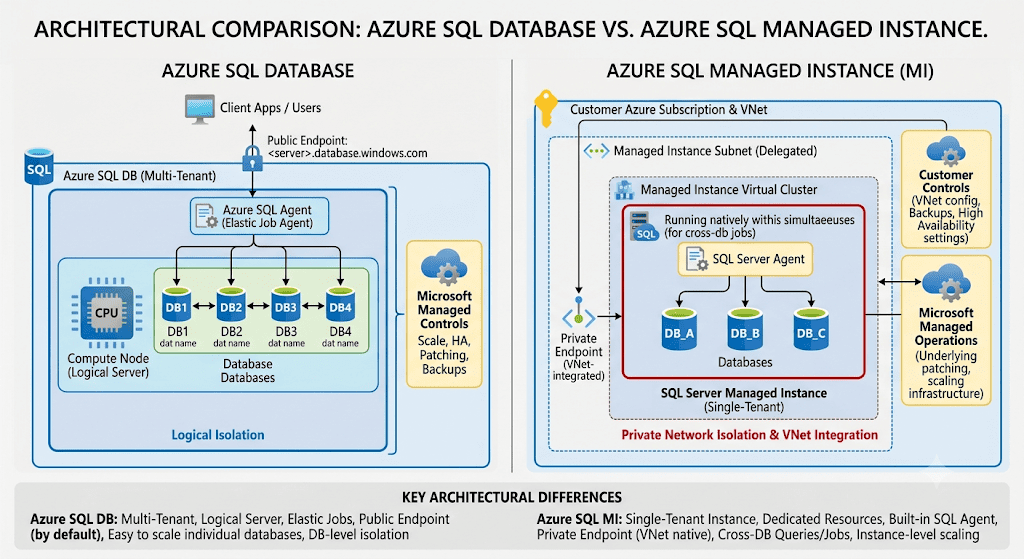
Architectural differences of SQL DB vs SQL MI
Choosing between Azure SQL Database and Azure SQL Managed Instance (MI) generally comes down to a single underlying question: Are you building a brand-new application from scratch, or are you migrating an existing on-premises architecture to the cloud?
Here is a decision matrix to help you choose the right resource based on your architectural needs:
| Decision Factor | Azure SQL Database | Azure SQL Managed Instance |
| Primary Use Case | Building new, modern cloud-native applications. | “Lift and shift” migrations of legacy applications. |
| Scope | Single database. | Instance level (multiple databases). |
| Feature Compatibility | Core SQL engine features only. | Near 100% on-premises SQL Server compatibility. |
| Cross-Database Queries | Not natively supported. | Fully supported. |
| Job Scheduling | Requires Elastic Jobs or Azure Automation. | Includes native SQL Server Agent. |
| Network Isolation | Public endpoint with Private Link options. | Deployed natively within your Virtual Network (VNet). |
| Management Overhead | Lowest (pure PaaS). | Low (PaaS, but with deeper instance-level control). |
| Database sync for HADR | Failover Groups | Failover Groups |
| Backup and Restore | Automated | Automated |
For legacy applications, choosing SQL Managed Instance allows for a smooth “lift and shift” migration, saving you the significant time and effort that would otherwise be required to rewrite your code for Azure SQL Database.
Compute, Storage, and Service Tiers Comparison
The following table lists the comparison between SQL Database and Managed Instance.
| Feature | Azure SQL Database | Azure SQL Managed Instance |
| Service Tiers | General Purpose, Business Critical, Hyperscale | General Purpose (including Next-gen), Business Critical |
| Compute Type | Provisioned, Serverless, DTU (Database Transaction Units) | Provisioned only |
| Compute (vCores) | GP & BC: 2 to 128 vCores Hyperscale: 2 to 192 vCores | 4 to 128 vCores (depending on hardware generation) |
| Max Storage Size | GP & BC: Up to 4 TB Hyperscale: Up to 128 TB | General Purpose: Up to 32 TB (Next-gen) or 16 TB Business Critical: Up to 16 TB |
| Storage Architecture | GP: Premium remote storage BC: Fast local SSD storage Hyperscale: Decoupled storage with local SSD cache | GP: Remote Azure Blob storage BC: Fast local SSD storage |
BC means Business Critical service tier. GP means General Purpose Service tier.
Refer the official documentations for vcore model, serverless model and DTU of SQL DB and SQL MI.
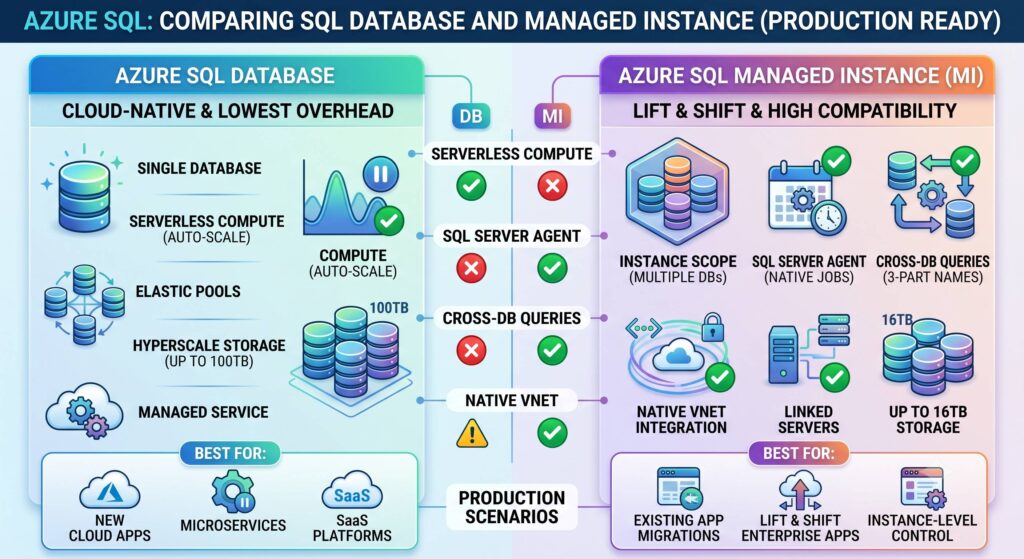
The Decision Matrix: Exactly when to choose which resource.
Deciding between Azure SQL Database and SQL Managed Instance ultimately comes down to your application’s architecture, migration strategy, and specific feature requirements. Use the matrix below to quickly evaluate your workload and determine exactly which resource is the right fit for your project.
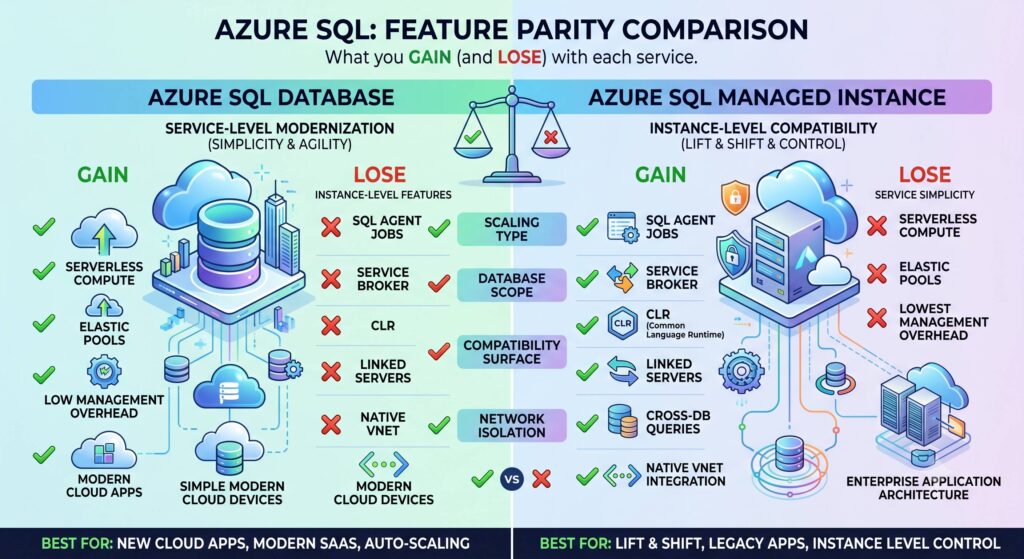
Feature Parity: What you gain (and lose) with SQL DB and SQL MI
Here is a breakdown of what you gain and lose when choosing one over the other.
Choosing SQL Managed Instance (SQL MI)
SQL MI is designed as a “lift-and-shift” destination. It offers nearly 100% surface-area compatibility with the latest on-premises SQL Server Enterprise Edition.
What You Gain
- Instance-Level Features: You get native support for SQL Server Agent (for scheduling jobs), Database Mail, and Linked Servers to connect to external data sources.
- Cross-Database Queries: You can natively query across multiple databases within the same instance using standard three-part or four-part naming conventions.
- Common Language Runtime (CLR): Full support for custom .NET assemblies inside your database.
- Service Broker: Native message queuing and routing capabilities within the database engine.
- Native VNet Security: SQL MI is always deployed inside your private Azure Virtual Network, providing strict network isolation out of the box.
What You Lose
- Agility in Scaling: Provisioning a new SQL MI or scaling its compute/storage takes significantly longer than SQL DB (often hours compared to minutes) because underlying virtual clusters must be reconfigured.
- Serverless Compute: SQL MI does not offer a serverless tier. You pay for the instance 24/7 if the instances are part of a failover group. For a single instance, you can choose to start and stop anytime.
Choosing SQL Database (SQL DB)
SQL DB is optimized for modern SaaS applications where each database is an independent, highly isolated silo.
What You Gain
- Serverless Auto-Scaling: SQL DB offers a Serverless compute tier that automatically scales CPU and memory based on workload demand, and can even automatically pause (and stop billing for compute) when inactive.
- Hyperscale Architecture: The Hyperscale tier allows databases to grow beyond 100 TB with nearly instantaneous backups and rapid scaling, untethering storage limits from compute limits.
- Lower Entry Cost: Because you can provision a single, highly isolated database, the starting price point is dramatically lower than standing up an entire Managed Instance.
- Speed: Deploying, scaling up, or scaling down happens in minutes.
What You Lose
- SQL Server Agent: You cannot use SQL Agent. You must rewrite jobs using alternative cloud schedulers like Elastic Database Jobs or Azure Automation.
- Cross-Database Simplicity: Native cross-database queries are not supported. You must implement Elastic Queries, which are more complex to configure and can suffer from performance limitations.
- Legacy Feature Support: No CLR, no Database Mail, no Service Broker, and no Linked Servers. Applications relying on these must be refactored.
Cost Differences: Licenses, Reservations, and Failover Rights
While Azure SQL Database (SQL DB) generally has a lower starting price because you only provision individual databases, the total cost of ownership for both SQL DB and SQL Managed Instance (SQL MI) heavily depends on how you leverage Microsoft’s licensing and commitment discounts.
Here is how the major cost-saving mechanisms apply to both:
1. Azure Hybrid Benefit (AHB) If you already own on-premises SQL Server licenses with active Software Assurance, you can bring them to the cloud using the Azure Hybrid Benefit. This removes the SQL Server licensing fee from your hourly rate, meaning you only pay for the underlying Azure infrastructure (compute and storage).
For SQL MI: You apply your core licenses to the entire instance. This is highly cost-effective if you are migrating a consolidated server with dozens of databases, as one license covers the shared resources.
For SQL DB: You apply licenses to the individual vCores of your specific databases or Elastic Pools. (Note: AHB is not available for the Serverless compute tier).
2. Azure Reservations For production workloads with predictable resource needs, you can commit to a 1-year or 3-year reservation.
- Purchasing reserved compute capacity can discount your infrastructure costs by up to 80% compared to pay-as-you-go rates when combined with the Azure Hybrid Benefit.
- SQL MI reservations apply to the instance’s compute size, whereas SQL DB reservations apply to the vCores of the database or pool.
3. Standby Replicas and Failover Rights When designing for High Availability and Disaster Recovery (DR), licensing costs for your secondary servers can quickly double your bill.
- SQL MI Failover Rights: Microsoft offers a specific licensing benefit for SQL MI where you do not have to pay SQL Server licensing fees for a geo-secondary replica if it is designated strictly as a standby instance for disaster recovery. As long as you are not running read-intent workloads (like reporting) on that secondary instance, you only pay for the base infrastructure compute and storage.
- SQL DB: While SQL DB also supports auto-failover groups, you generally pay for the secondary database’s compute. However, because SQL DB offers Serverless tiers (which can auto-pause) and granular compute sizing, you can often keep the DR replica scaled down to minimize costs until a failover occurs.
Pricing Detail Links
Pricing – Azure SQL Database Single Database | Microsoft Azure
Pricing – Azure SQL Managed Instance Single Instance | Microsoft Azure
Read Also:
What is the difference between SQL Server and SQL Managed Instance?
Step-by-Step Guide: Creating an Azure SQL Managed Instance (Pay-As-You-Go & Free Offer)
When to use PITR and Geo-Restore in Azure SQL MI or SQL DB
Different database restore methods in Azure SQL MI
If you have any questions on the differences between SQL DB and SQL MI, post a comment and I will respond back.